
Car Launcher Pro
Apps LabDevAuto & Vehicles
4.4785.00 Reviews
- Version
- 5.5.0.85
- Installs
- 100.00K
- Age Rating
- Everyone
Screenshots
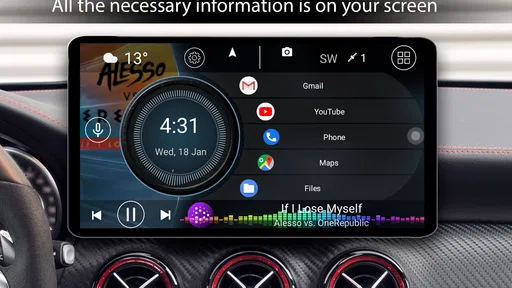
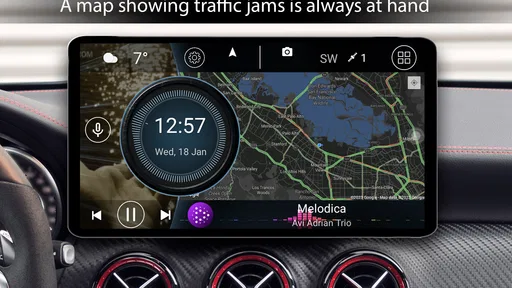
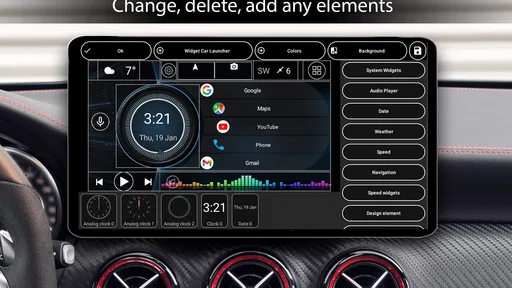
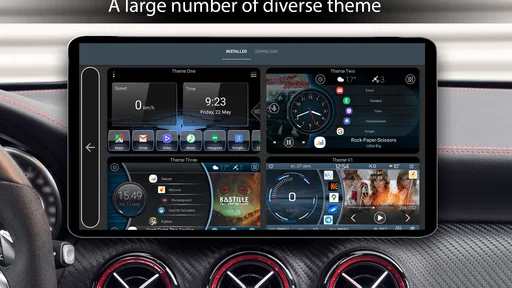
Our Review of Car Launcher Pro
 Analysis by Appyee
I find a car launcher most useful when it solves one small but persistent problem: getting to the right phone app without digging through a crowded home screen. Car Launcher Pro is built around that idea, presenting a driving-focused home screen where the things I reach for most can be easier to spot. Its value depends less on how many options I arrange and more on whether I can make the layout simple enough to use at a glance.
A home screen shaped around driving
Instead of replacing navigation or music apps, this Auto & Vehicles app gives them a more convenient place to start. I think of it as a front panel for a phone used in the car: a launcher can bring chosen apps and controls forward, while the underlying services still do their own jobs. That distinction matters. It can reduce the effort of finding an app, but it cannot make looking at a screen risk-free, so I would set things up while parked and keep interactions brief once moving.
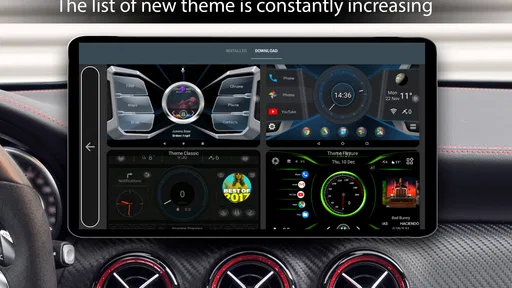
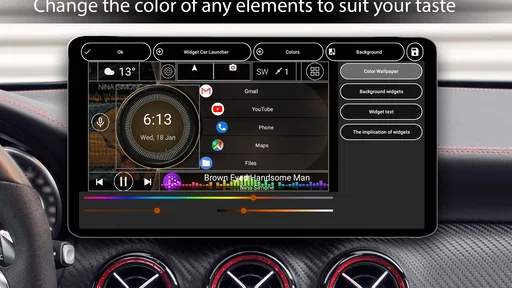
The central capability is customization. I can arrange a home screen around the tasks I actually use, rather than accept a general phone layout that may be full of unrelated icons. The practical benefit is not personalization for its own sake; it is reducing visual clutter. A small set of clear choices is easier to scan than a page packed with shortcuts, especially when I am preparing to leave and want navigation or audio ready before setting off.
How the layout earns its place
Setup is most useful when I treat it as a short planning exercise. I would choose the navigation and audio apps I already rely on, place them where they are easy to reach, and avoid filling every available space just because the launcher permits it. Theme and icon-size adjustments can help make the screen more legible, but a polished look is secondary to a layout that makes sense without thought. If a shortcut is not part of my usual drive, it probably does not belong on the main screen.
There is also a useful distinction between what the launcher can organize and what the connected apps provide. Choosing a navigation app from the home screen can make it quicker to begin a route, but route guidance still depends on that navigation app and its own conditions. Similarly, a music control can help me reach playback, but it does not replace the music service or change how that service works. I see this as a convenience layer, not an all-in-one driving system.
A realistic commute, and a longer trip
On an ordinary morning, I would open the launcher while parked, tap my navigation shortcut, and get the route ready before pulling away. If I want music, I can make that a deliberate choice before driving too. The benefit is most noticeable at the start of a trip, when a familiar, uncluttered screen can spare me from searching through several phone pages. It is a small improvement, but repeated daily, small reductions in setup friction can make a routine feel calmer.
For a longer drive, the same arrangement can make the phone’s role easier to predict: navigation has a known place, and audio is not mixed among unrelated apps. Offline access to the launcher itself should not be confused with offline maps, streaming or live traffic; those depend on the separate apps and the connection or downloaded content they require. I would check the route and audio situation before leaving an area with weak reception rather than expect the launcher to solve connectivity.
What it does not replace
Compared with a standard phone home screen, this app is aimed at car use rather than general everyday organization. That focus can be worthwhile if I regularly mount my phone in the car and want a dedicated arrangement. If I only drive occasionally, use a built-in vehicle display, or already find my phone’s existing shortcuts quick enough, installing another launcher may add little. A built-in infotainment system can also be the better choice when it offers the controls and screen integration I need without handling the phone while driving.
The trade-off is that a more tailored interface asks me to spend time choosing and maintaining its layout. Customization is helpful only if it stays restrained; too many prominent shortcuts can recreate the clutter I wanted to avoid. I would also test the arrangement while parked and confirm that the apps I use open as expected. This is a phone launcher, not a promise that every device, car mount or third-party app will behave identically.
Who benefits most from this approach
I would recommend considering it if a phone is a regular part of your driving routine and you want a home screen dedicated to that setting. It is a better fit for someone who knows which navigation and music apps they use and is willing to arrange a few clear shortcuts than for someone looking for a new navigation service, hands-free system or replacement for a car’s built-in display. Drivers who prefer to leave the phone untouched and rely entirely on vehicle controls may not gain enough to justify changing their setup.
Easy Setup and Interface
First off, setting up Car Launcher Pro is a breeze. Once you download it, the app guides you through a simple installation process. You're greeted with a sleek, customizable interface that feels intuitive and responsive. The icons are large enough to tap easily, which is a lifesaver when you're on the road.
One of the standout features is the ability to customize the home screen. Whether you want quick access to your favorite navigation apps, music players, or even a speedometer, it’s all possible with just a few taps. The personalization options are extensive, allowing you to change themes, icon sizes, and even add widgets. It's like having a dashboard tailor-made to your preferences.
Navigation and Music at Your Fingertips
Let’s face it, navigating while driving can be stressful. Car Launcher Pro integrates seamlessly with your favorite navigation apps, such as Google Maps or Waze. You can set your default navigation app and launch it with a single tap. This ensures that you’re not taking your eyes off the road for too long.
Now, if you’re like me and love jamming to tunes while driving, the integrated music controls are a game-changer. You can link Spotify, Apple Music, or any other music app and control your playlist directly from the launcher. The sound quality and user interface remain intact, making the whole experience enjoyable without unnecessary distractions.
Performance and Usability
The app is made by Apps LabDev and costs $6.99, so I would decide whether its dedicated layout fits my routine before paying rather than treating it as an essential download. It is rated for Everyone, has a 4.4 average from around 43,000 ratings, and has been installed over 100,000 times. Those figures suggest a sizable audience, but they do not tell me whether the interface suits my particular phone or driving habits; a short, careful setup is still the best test.
Its release date is June 23, 2015, and the current version is 5.5.0.85, with Android 5.0 or later required. Those details are useful when checking an older spare phone that might otherwise serve as a dedicated car screen. I would confirm the device’s Android version and test the display in its actual mount before relying on it for a commute. A launcher that is comfortable on a desk can feel quite different at the angle and distance where it will be used.
Performance-wise, Car Launcher Pro is top-notch. The app runs smoothly without any noticeable lag, which is crucial when you're relying on it for quick responses. The developers have done a fantastic job ensuring that transitions between apps and features are fluid.
One thing that’s particularly impressive is the app’s ability to work offline. If you find yourself in an area with spotty internet, Car Launcher Pro remains reliable. Your essential apps and settings are still accessible, which is perfect for long road trips where connectivity might be an issue.
Safety Features
One practical setup tip is to decide which actions belong on the launcher and which should wait until the car is stopped. I would keep the front screen focused on a few predictable choices, then handle searches, playlist changes and other fiddly tasks before departure or after parking. Larger icons can make a tap easier, but they do not remove the need to keep attention on traffic. In that sense, the best customization is often subtraction: fewer choices can make the screen quicker to understand.
Another consideration is what happens when the phone is shared. A layout designed for one driver may not be obvious to a passenger or another family member. If someone else regularly uses the car, I would keep the main screen self-explanatory and avoid relying on a personal arrangement that only I remember. For a one-driver vehicle, by contrast, familiar placement can become a useful habit and make the launcher feel more natural over time.
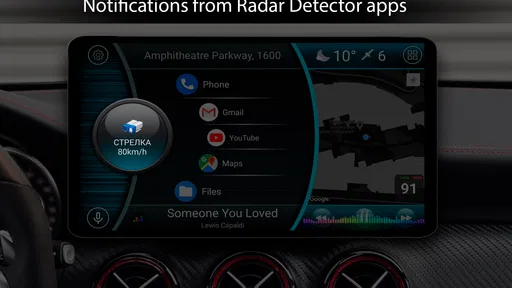
Safety is a priority for any driver, and Car Launcher Pro doesn’t skimp on this aspect. The app includes a built-in speedometer and compass, which are handy tools for any driver. There’s also an option to display your current speed prominently on the screen, helping you keep track of your driving without needing to glance at the dashboard constantly.
The app also supports voice commands, which is a huge plus. You can control navigation, call contacts, or play music using your voice. This feature minimizes distractions and keeps your focus on the road.
Wrapping Up
For me, the key question is not whether a customized car screen looks better than a regular phone home screen, but whether it makes the start of a trip more straightforward without encouraging extra interaction. That is why I would try a restrained layout first and use it on familiar journeys before deciding how much to personalize. If I still find myself hunting for controls or making unnecessary taps, a simpler phone setup—or the vehicle’s own interface—would be the more sensible choice.
All in all, Car Launcher Pro is a fantastic tool for anyone looking to enhance their driving experience. Its combination of customization, ease of use, and integration with other apps makes it a must-have. Whether you're on a daily commute or a cross-country road trip, this app is like having a co-pilot right on your phone.
If you’re ready to transform your driving experience, give Car Launcher Pro a try. It’s available for download on both Android and iOS, making it accessible no matter what device you're using. Drive safely, and enjoy the ride!
Verdict
Strengths of Car Launcher Pro
- Customizable interface for a personalized experience.
- Widget support for quick access to apps.
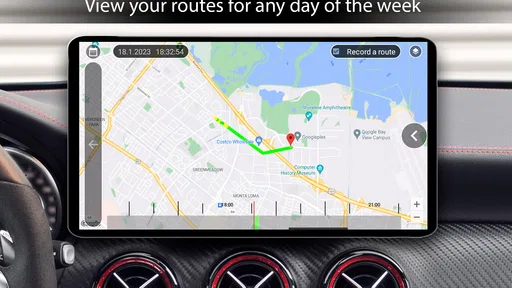
- Integrated GPS for seamless navigation.
- Voice commands enhance driving safety.
- Supports multiple car profiles for easy switching.
Limitations of Car Launcher Pro
- Limited free features in the app version.
- Occasional crashes on older devices.
- May drain battery quickly if not optimized.
- Interface can be overwhelming for new users.
- Updates sometimes disrupt existing settings.
Other Releases by Apps LabDev
View All
Car Launcher
Auto & Vehicles4.3

CL Theme Flexure
Auto & Vehicles4.1
Similar Picks in This Category
View All
Android Auto
Google LLC4.1

maxim — order a taxi & food
PT. SITO4.7

Штрафы ГИБДД: проверка с фото
Pays LLC – Штрафы ГИБДД4.7

Номерограм – проверка авто
Авто Ассист4.8

Дром Авто
Дром4.9

Frequently Asked Questions
What features does Car Launcher Pro offer to enhance the driving experience?
Car Launcher Pro is designed to optimize your smartphone for in-car use. It features a user-friendly interface with large icons and easy navigation. The app allows you to access essential functions like GPS, music, and calls with minimal distraction. It also supports custom widgets, themes, and integration with various car systems.
Is Car Launcher Pro compatible with both Android and iOS devices?
Car Launcher Pro is primarily available for Android devices. It offers seamless integration with Android's ecosystem, providing a smooth experience tailored for in-car use. Unfortunately, an iOS version is not available, so iPhone users will need to seek alternative options for a similar experience.
How does Car Launcher Pro improve safety while driving?
Safety is a core focus of Car Launcher Pro. The app minimizes driver distraction by simplifying access to essential features. Large buttons and a streamlined interface allow users to operate the app with minimal interaction, reducing the need to look away from the road. It also supports voice commands for hands-free operation.
Does Car Launcher Pro support customization, and how can I personalize it?
Yes, Car Launcher Pro offers extensive customization options. Users can personalize their interface with custom widgets, themes, and layouts to suit their preferences. The app allows for rearranging icons, choosing different color schemes, and integrating third-party apps, making it a versatile tool tailored to individual needs.
What are the key pros and cons of using Car Launcher Pro?
Car Launcher Pro's major advantages include its user-friendly interface, customization options, and focus on safety. However, it may not be compatible with all car systems, and some users have reported occasional performance issues. It's essential to check compatibility with your specific device and vehicle setup before downloading.
